Digital Minimalism:
You would never let a stranger walk into your living room and rearrange your furniture, leave clutter on your coffee table, and interrupt your dinner conversation whenever they felt like it. Yet that is essentially what most of our phones do to us, dozens of times a day: uninvited notifications, cluttered home screens, apps we didn't choose to open but ended up in anyway.
Digital minimalism borrows a simple idea from the way we care for our physical homes: intentionality. Just as you wouldn't fill your living room with things that don't serve you, your phone doesn't need to be filled with apps, alerts, and habits that don't serve you either. This guide walks through a home-inspired framework for decluttering your digital life one room, one drawer, one shelf at a time.
Table of Contents
- What Digital Minimalism Really Means
- Step 1: The App Declutter (Clearing Out the Clutter Drawer)
- Step 2: The Notification Audit (Who's Allowed to Knock on Your Door?)
- Step 3: Screen-Time Rituals (Setting House Rules)
- Building a Home Screen You Actually Want to Look At
- Common Mistakes People Make With Digital Minimalism
- How to Make It Last
- Frequently Asked Questions
- Final Thoughts
What Digital Minimalism Really Means
Digital minimalism isn't about throwing your smartphone in a drawer or moving to a cabin without Wi-Fi. It's a philosophy, popularized by writer Cal Newport, that treats your attention as a limited resource worth protecting the same way you'd protect the physical space in your home.
Think of your phone as a house you live in for several hours a day. Every app is a piece of furniture. Every notification is a knock at the door. Every scrolling habit is a room you keep wandering into out of boredom rather than purpose. Digital minimalism simply asks: would I choose to keep this if I were designing my digital home from scratch today?
The goal isn't zero technology. It's a phone that serves your life instead of quietly running it.
Step 1: The App Declutter (Clearing Out the Clutter Drawer)
Every home has a junk drawer, the one filled with old receipts, dead batteries, and things you meant to deal with "eventually." Most phones have the digital equivalent: screens full of apps you downloaded once, forgot about, or keep out of guilt rather than use.
How to declutter your apps:
- Go through every screen, app by app. For each one, ask: When did I last genuinely need this? Not "might use someday" genuinely needed, recently.
- Delete anything unused in the last 30 days, except essentials like banking or navigation apps.
- Separate "tools" from "time holes." Tools help you accomplish something specific (maps, banking, notes). Time holes exist primarily to keep you scrolling (most social and entertainment apps fall here). Be honest about which category each app belongs to.
- Keep time-holes off your home screen entirely. They don't need to be deleted necessarily, but they don't deserve prime real estate either. Move them to a folder on a secondary screen, or better, log in only through a browser when needed.
- Reinstall consciously, not automatically. If you delete an app and genuinely miss it after a week, that's meaningful data. If you don't think about it again, you have your answer.
This is the digital equivalent of clearing out a cluttered closet, not because clutter is evil, but because a crowded space quietly increases mental noise, even when you're not consciously aware of it.
Step 2: The Notification Audit (Who's Allowed to Knock on Your Door?)
Imagine if every acquaintance, every store, and every distant colleague had a key to your front door and could walk in whenever they wanted. That's essentially what unmanaged notifications do to your mental space.
How to audit your notifications:
- Turn off notifications for everything by default, then add back only what truly requires real-time attention: calls, messages from close contacts, and calendar reminders.
- Batch, don't ban, useful updates. Email and news apps rarely need instant alerts. Check them on your own schedule instead of theirs.
- Separate "urgent" from "important." A message from your child's school is urgent. A sale notification from a shopping app is neither urgent nor important; it's designed to feel urgent.
- Use "Do Not Disturb" as your default state, not an occasional favor you grant yourself. Let notifications be the exception, not the baseline.
- Revisit the list monthly. Apps evolve, and so do your needs. What deserved a notification six months ago might not deserve one today.
A well-audited notification system means your phone rings, buzzes, or lights up only for things that genuinely matter to you, not for things designed by someone else to capture your attention.
Step 3: Screen-Time Rituals (Setting House Rules)
A tidy home stays tidy because of small, repeated habits: taking off shoes at the door, doing dishes before bed, not leaving clutter on the counter. Digital minimalism works the same way: rituals matter more than willpower.
Rituals worth building:
- A "front door" ritual: decide when your phone re-enters your life each morning, not the instant you wake up, but after a chosen anchor point like breakfast or your morning walk.
- A "no phones in the bedroom" rule, or at least a designated charging spot outside arm's reach from your bed.
- A weekly screen-time review, glancing at your phone's built-in usage report, not to judge yourself, but to notice patterns honestly.
- App time limits for time-holes specifically not to punish yourself, but to create a natural pause before endless scrolling begins.
- A "digital sunset", an hour before bed when screens are set aside in favor of reading, journaling, or simply winding down.
These rituals work not because they rely on discipline in the moment, but because they remove the need for willpower altogether. A phone charging in the kitchen overnight requires zero self-control to avoid checking at 2 a.m. the friction does the work for you.
Building a Home Screen You Actually Want to Look At
Just as a well-designed room feels calmer than a cluttered one, a well-designed home screen can quietly reduce mental friction every time you unlock your phone.
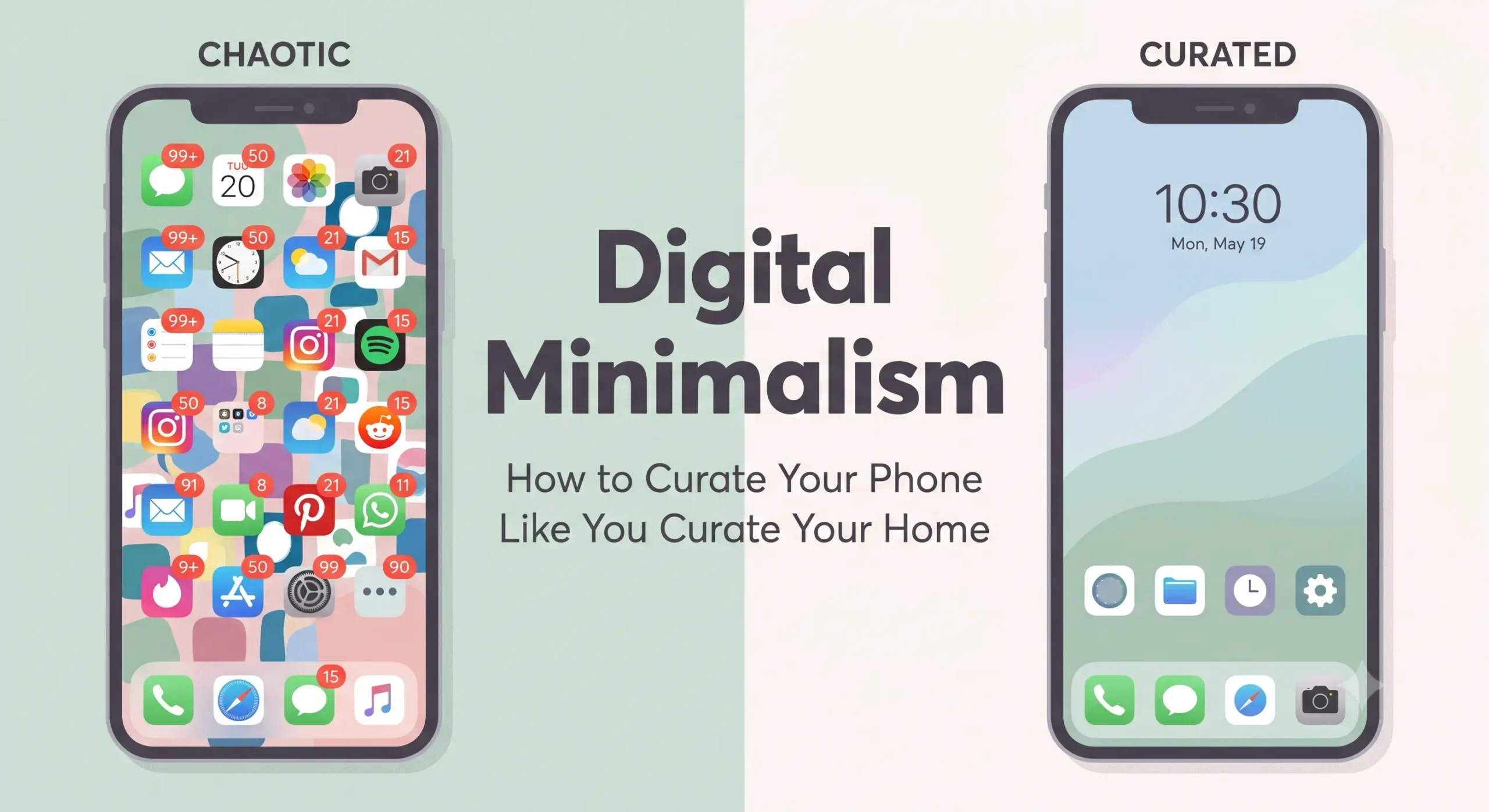
- Keep only 4–6 essential apps on your main screen, the ones you use with real intention.
- Remove app badges and unread counts where possible; a red number demanding attention is a tiny, constant tug on your focus.
- Switch to grayscale mode, even temporarily. Removing color makes apps noticeably less visually rewarding, which naturally reduces compulsive checking.
- Use a calming wallpaper, not a decorative one that adds visual noise. Simplicity here mirrors the simplicity you're aiming for in your habits.
Common Mistakes People Make With Digital Minimalism
- Trying to overhaul everything in one day. Like decluttering a home, digital decluttering works best room by room, not all at once.
- Confusing minimalism with total abstinence. The goal is intentional use, not eliminating technology.
- Deleting apps without addressing the underlying habit. If boredom is the real trigger, deleting one app often just shifts the compulsive scrolling to another.
- Doing it once and never revisiting. Digital habits drift back over time; periodic small audits matter more than one big cleanup.
How to Make It Last
- Start with the notification audit first; it has the fastest, most noticeable impact with the least effort.
- Move to the app declutter next, ideally on a day when you have twenty uninterrupted minutes.
- Introduce one screen-time ritual at a time, giving each one at least a week before adding another.
- Reassess quarterly. Treat it like seasonal home decluttering, a recurring practice, not a one-time fix.
- Involve your environment, not just your willpower. Charging stations outside the bedroom, grayscale mode, and app-free zones all reduce the need for constant self-discipline.
Frequently Asked Questions
Is digital minimalism the same as a digital detox? Not quite. A digital detox is usually temporary and total no screens for a set period. Digital minimalism is an ongoing, sustainable relationship with technology, not a short-term break from it.
Do I need to delete social media entirely? No. Many people keep social apps but change how and when they access them, for example, only through a browser, or only during set windows of the day, rather than deleting them outright.
How long does it take to see results? Most people notice reduced mental clutter and calmer mornings within one to two weeks of consistent notification and app management.
What's the first step I should take today? Turn off notifications for everything except calls and messages from close contacts. It's the single highest-impact change with the lowest effort.
Final Thoughts
Your phone doesn't have to be a cluttered, chaotic space that quietly runs your attention without your permission. With the same care you'd bring to tidying a room or organizing a shelf, you can curate a digital home that reflects your actual priorities, not the priorities of every app competing for your attention.
Start small: one notification setting today, one unused app deleted tomorrow, one screen-time ritual by the end of the week. Digital minimalism isn't about doing less with technology; it's about making sure the technology you keep is there because you chose it, not because it simply arrived and never left.
This is a block of text. Double-click this text to edit it.